
A C++ developer platform for building native applications.
Website · Documentation · Registry · Engineering Notes
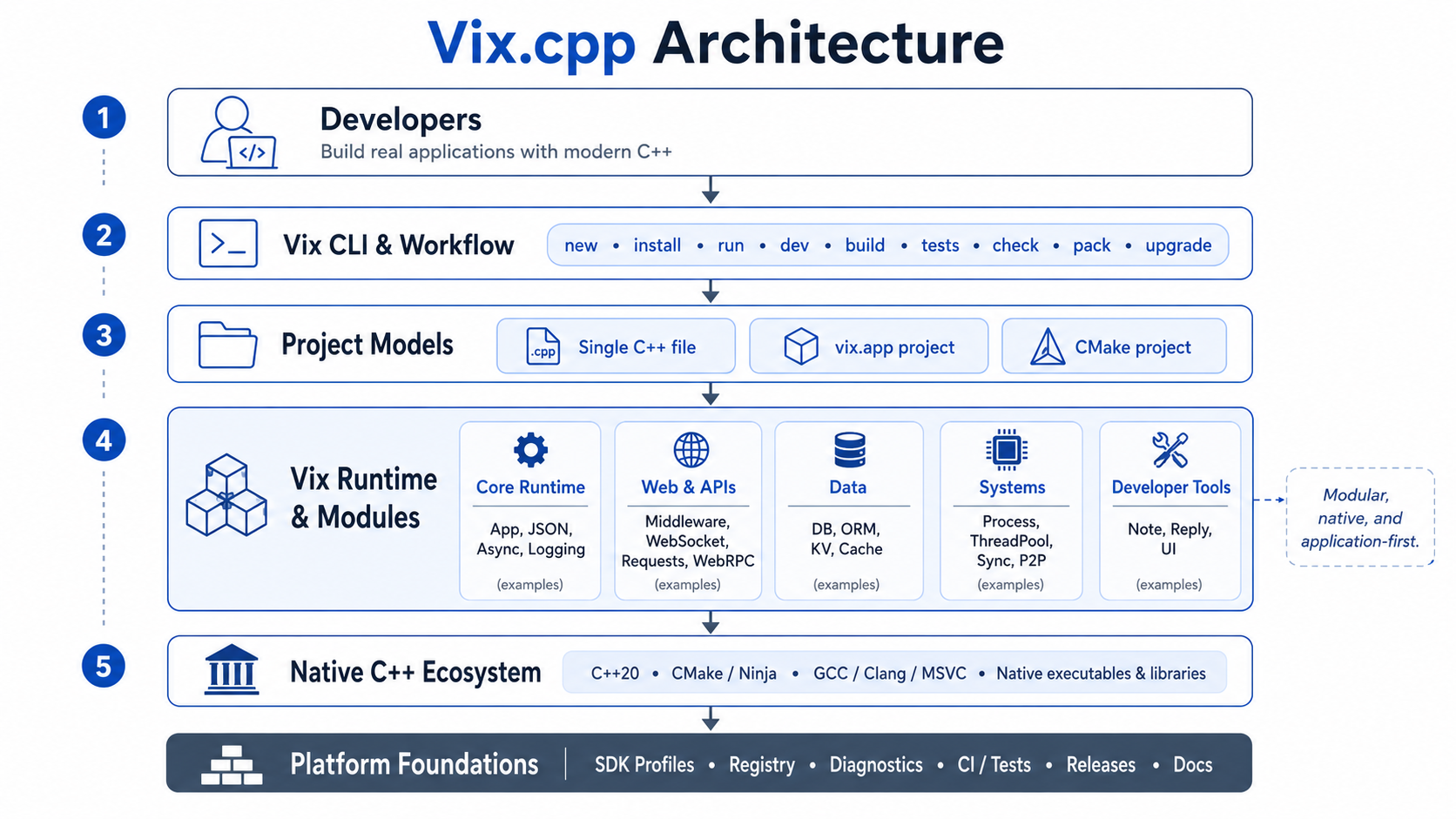
Vix.cpp brings the tools around a C++ application into one coherent workflow. You can use it to run and build projects, manage dependencies, work with application modules, run tests, inspect problems, package applications and prepare them for production.
Vix does not introduce a new language or hide the native C++ toolchain. A Vix project is still compiled by a C++ compiler, can work with CMake and existing libraries, and produces normal native executables and libraries.
C++ already gives developers excellent compilers, native performance and a large ecosystem. The difficult part often starts when a program becomes an application.
A project needs a build configuration. Then dependencies, tests, development commands, diagnostics, packaging and eventually production tooling appear. There are good tools for each of these problems, but developers still have to assemble them and maintain the workflow between them.
Vix exists to make that workflow more consistent without replacing the C++ ecosystem underneath it.
Install Vix on Linux or macOS:
curl -fsSL https://vixcpp.com/install.sh | bashOn Windows PowerShell:
irm https://vixcpp.com/install.ps1 | iexCheck the installation:
vix --versionYou can start with a normal C++ file.
#include <iostream>

int main()
{
    std::cout << "Hello from Vix.cpp\n";
}
Run it with:
vix run main.cppThere is no separate execution model here. Vix builds and runs native C++.
When the project becomes larger, the same CLI can work with complete applications:
vix init
vix run
vix build
vix tests
vix check
The installation guide explains SDK profiles, platform requirements and the complete setup process.
Vix is more than a command that invokes a compiler. The platform includes runtime modules and development tooling for the things real applications commonly need, including HTTP, middleware, asynchronous execution, WebSockets, configuration, filesystems, processes, databases, serialization, caching, validation and logging.
These parts are designed to work together instead of giving every library its own project structure and development workflow.
For Vix-managed applications, the project can be described with vix.app:
name = "api"
type = "backend"
standard = "c++20"

sources = [
  "src/main.cpp",
]

packages = [
  "vix",
]

links = [
  "vix::vix",
]
Vix reads the application description and generates the native build it needs internally. The generated files remain inspectable, and projects that need custom CMake logic can continue using CMake directly.
Existing C++ libraries can be used from a Vix project.
For example:
vix install https://github.com/fmtlib/fmtVix can detect the dependency information, add it to the application and preserve the resolved commit in vix.lock.
A dependency can also be used temporarily without modifying the application:
vix run main.cpp --dep https://github.com/fmtlib/fmtThe goal is not to create a separate library ecosystem. Dependencies remain native C++ dependencies and participate in the normal build.
Large applications can be divided into modules while remaining a single native application.
vix modules init
vix modules add auth
vix modules add realtime --websocket
vix modules check
vix build
A module can own its public interface, private implementation, tests and dependencies. Vix validates the relationships between modules and generates the registration and linking code required by the application.
This gives larger C++ applications explicit boundaries without requiring every feature to become a separate service or process.
Vix is not a replacement for C++, CMake or the compiler.
Existing CMake projects can keep their current structure and use Vix around them. New projects can start with vix.app when they do not need custom build logic.
In both cases, the important parts remain accessible to the developer: compiler diagnostics, dependencies, generated build files and native outputs.
Vix tries to remove repetitive work around C++ without making the underlying system mysterious.
Vix also includes tools for working with C++ outside the normal edit, build and run cycle.
Vix Reply is an interactive terminal for experimenting with native C++ and inspecting compiler diagnostics.
vix replVix Note is a visual workspace for executable notes, experiments and developer tooling.
vix noteThey use the same C++ environment as the rest of the platform rather than introducing another language or runtime.
The workflow continues beyond local development.
vix deploy --dry-run
vix deploy
vix doctor production
Vix can help with build and test checks, service restarts, application health, production diagnostics and deployment recovery while leaving the application infrastructure under the developer's control.
The Vix Registry provides reusable C++ packages that can be installed through the Vix dependency workflow.
Packages remain normal native dependencies. Together with vix.lock and SDK profiles, this makes it easier to reproduce the same project environment on another machine or in CI.
This README is only an introduction to the project.
The Vix.cpp documentation covers the application model, CLI, build workflow, runtime, modules, dependencies, SDK profiles, testing, production workflows and internal architecture in more detail.
Technical decisions, benchmarks and engineering work are published in the Engineering Notes.
Vix.cpp is developed in the open. Contributions to the runtime, modules, diagnostics, tests, documentation, registry, CI, portability and performance are welcome.
For larger changes, opening an issue or discussion first makes it easier to consider the design in the context of the whole platform.
See CONTRIBUTING.md, SECURITY.md, CODE_OF_CONDUCT.md and CHANGELOG.md.
Vix.cpp is maintained by Softadastra, a computing research and technology company.
Vix.cpp is available under the MIT License. See LICENSE.